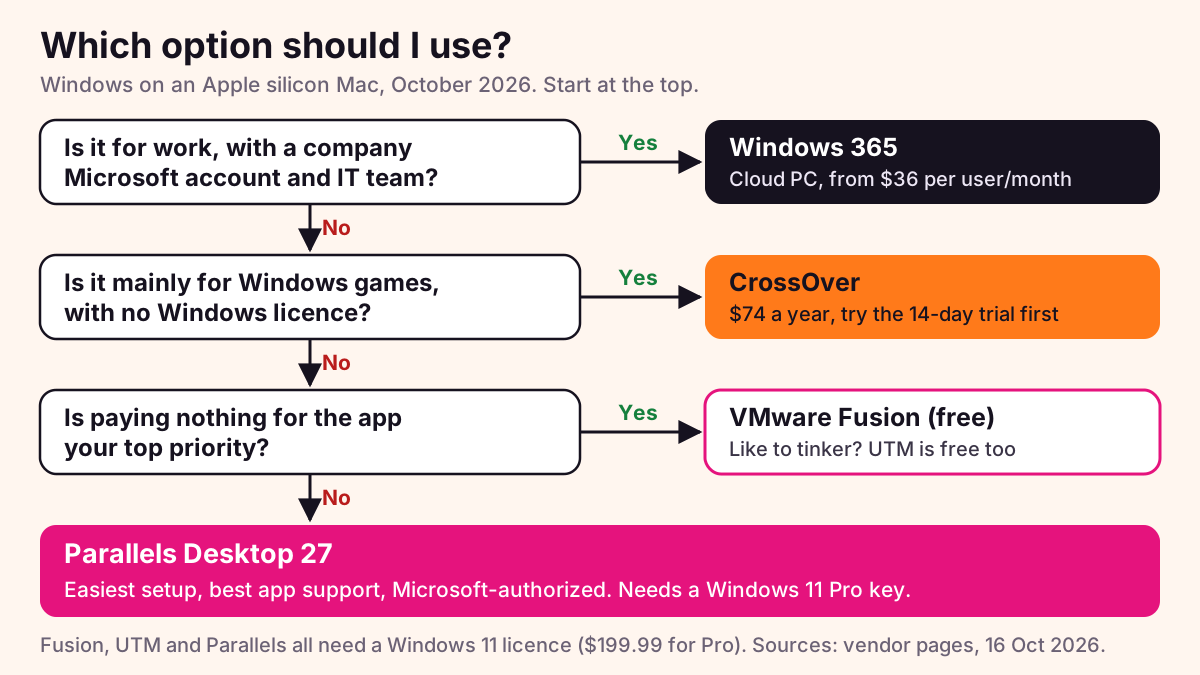
For most people in 2026, Parallels Desktop is the best way to run Windows on a Mac. It is the easiest to set up, it runs the most apps, and Microsoft has authorized it for Windows 11 on Apple silicon. If free matters more, VMware Fusion costs nothing and runs Windows 11 well.
If you only want Windows games and don’t want to buy a Windows licence, try CrossOver. UTM is free and open source for people who like to tinker. If your company needs Windows for work, Windows 365 gives you a cloud PC that IT manages.
The short version
- Boot Camp does not exist on Apple silicon Macs. Apple only supports it on Intel Macs.
- macOS 27 Golden Gate (released 14 September 2026) runs only on Apple silicon, so a virtual machine, CrossOver or the cloud are now the only ways to use Windows on a new Mac.
- Parallels, Fusion and UTM run Windows 11 for Arm. You still need a Windows 11 licence ($199.99 for Pro from the Microsoft Store in the US).
- No local option runs DirectX 12 games inside Windows. CrossOver can run many DirectX 12 games without Windows.
- Kernel-level anti-cheat, Windows drivers and WSL2 are the usual things that break.
Last checked: 16 October 2026. This guide covers every Apple silicon Mac from M1 to M5, plus the new MacBook Neo.
What changed in 2026
Three things matter this year.
- macOS 27 Golden Gate is Apple silicon only. It came out on 14 September 2026 and needs an M1 or newer. macOS 26 Tahoe was the last version for Intel Macs.
- Boot Camp is gone for new Macs. Apple’s Boot Camp page says it needs a Mac with an Intel processor. Parallels Desktop 27 also removed its Boot Camp support. If you still have an Intel Mac, Boot Camp and Parallels Desktop 26 keep working there.
- New Macs arrived. The M5 Pro and M5 Max MacBook Pro came in March 2026, the M5 MacBook Air in March, and the Mac Studio with M5 Max or M5 Ultra in August. Apple also launched the $599 MacBook Neo, which uses an A18 Pro chip instead of an M-series chip, with 8 GB of memory.
A note on the MacBook Neo: Parallels says it is authorized to run Windows 11 “on all Apple silicon Macs, including M1, M2, M3, M4, M5, and MacBook Neo”. That is Parallels’ claim. Microsoft’s own support page still only names M1, M2 and M3 Macs. With 8 GB of memory shared between macOS and Windows, expect the Neo to handle light Office-style apps, not heavy work.
The five options compared
| Option | Price (US) | Windows licence needed? | Microsoft-authorized? | DirectX level | Games | Ease | Best for |
|---|---|---|---|---|---|---|---|
| Parallels Desktop 27 | From $99.99/year (Standard), check the live price | Yes | Yes (M1 to M3 on Microsoft’s page; Parallels says M1 to M5 and Neo) | DirectX 11.1, OpenGL 4.3 | Older and DX11 games | Easiest | Most people |
| VMware Fusion 26H1 | Free (personal and commercial) | Yes | No | DirectX 11, OpenGL 4.3 (per version history) | Light, older games | Good | Free, polished VM |
| UTM | Free, or $9.99 on the Mac App Store | Yes | No | No 3D acceleration for Windows | No | Takes effort | Tinkerers |
| CrossOver 26 | $74/year (CrossOver+) or $494 (Life) | No | Not applicable (no Windows) | Up to DirectX 12 via D3DMetal | Many modern games | Per app | Games without Windows |
| Windows 365 Business | From $36 per user/month | No separate key | Microsoft’s own service | Cloud PC, not built for games | No | Easy if IT sets it up | Work and IT teams |
Parallels Desktop 27
Version 27 came out in August 2026 and runs on Apple silicon only. The current build is 27.0.3 (7 October 2026). It needs macOS 14 Sonoma or later. It downloads Windows 11 for you, and Windows apps can open as normal Mac windows. Standard gives each virtual machine up to 8 GB of memory and 4 virtual CPUs. Pro and Business go up to 128 GB and 32 virtual CPUs.
- Fastest route from zero to Windows
- Microsoft-authorized for Windows 11 Pro and Enterprise
- 14-day free trial, 30-day money-back guarantee
- Yearly subscription for most editions
- No DirectX 12
- No WSL2 or Hyper-V
VMware Fusion
Broadcom made Fusion Pro free for personal use in May 2024 and for commercial use in November 2024. No licence key is needed. The current release, 26H1, came out on 14 May 2026 and stays free. Install the 26H1u1 update, which fixes a security issue announced in September 2026. The catch is support: there is no official paid support any more. Fusion is not on Microsoft’s authorized list, but Windows 11 for Arm runs on it and Fusion can download it for you.
UTM
UTM is free and open source. The $9.99 Mac App Store copy is the same app with automatic updates. Arm Windows runs at “near native speeds” through Apple’s Hypervisor framework. Emulating an x86 PC is possible but much slower. There is no GPU acceleration for Windows, so it is not for games or 3D work. It is great for testing, old software and learning.
CrossOver
CrossOver, from CodeWeavers, is based on Wine. It is not a virtual machine and you do not need a Windows licence. Version 26.0 (February 2026) added D3DMetal 3.0, Apple’s translation layer that handles DirectX 12. CodeWeavers’ release notes list games such as God of War Ragnarök, Borderlands 4, Helldivers 2 and Starfield. Support differs from game to game, so use the 14-day free trial before you pay. Whisky, the free alternative many people used, was discontinued in 2025 and its developer pointed users to CrossOver. Apple’s Game Porting Toolkit 4 is a tool for game developers, not an app for players.
Windows 365
Windows 365 is a Windows PC that lives in Microsoft’s cloud. You open it from the free Windows App on your Mac. Business plans cost $36, $56 or $108.80 per user per month, depending on size. The smallest plan has a 30-day free trial (card required). It needs a work or school account, not a personal Microsoft account. It also supports nested virtualization, so WSL2 works there, which is not true for local VMs on a Mac.
Total first-year cost
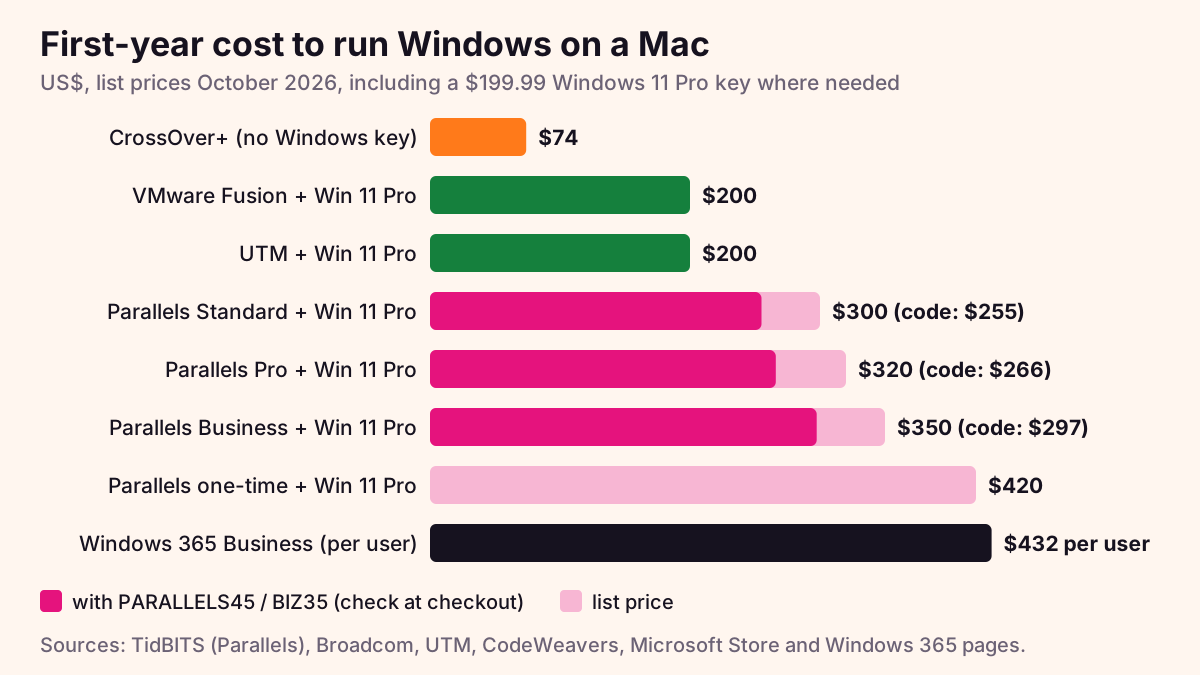
The app is only part of the bill. Parallels, Fusion and UTM all need a Windows 11 licence. Microsoft’s authorization covers Windows 11 Pro and Enterprise, so we use Pro ($199.99). Windows 11 Home is $139, but it is not part of that authorization.
| Setup | First-year total | App, year one | Windows 11 Pro |
|---|---|---|---|
| CrossOver+ | $74 | $74 | Not needed |
| VMware Fusion | $199.99 | $0 | $199.99 |
| UTM (free download) | $199.99 ($209.98) | $0 ($9.99 App Store) | $199.99 |
| Parallels Standard | $299.98 (about $254.98) | $99.99 (about $54.99 with PARALLELS45) | $199.99 |
| Parallels Pro | $319.98 (about $265.98) | $119.99 (about $65.99 with PARALLELS45) | $199.99 |
| Parallels Business | $349.98 (about $297.48) | $149.99 (about $97.49 with BIZ35) | $199.99 |
| Parallels Standard, one-time licence | $419.98 | $219.99 | $199.99 |
| Windows 365 Business, smallest plan | $432 per user | $36 x 12 months | No separate key |
The Windows key is a one-off cost, and Microsoft says the same product key works for Arm and x64 Windows. Subscriptions renew every year. Parallels prices are the list prices TidBITS reported at the August 2026 launch. Parallels’ buy page did not show prices when we checked, so check the live price at checkout.
What doesn’t work (honestly)
Windows on Apple silicon is Windows for Arm. Most x64 apps run through Prism, Microsoft’s built-in emulator in Windows 11 24H2 and later. But some things still fail:
- DirectX 12 inside a VM. Parallels supports up to DirectX 11.1 and says some AAA games will not launch. Fusion lists DirectX 11. UTM has no 3D acceleration for Windows. For DirectX 12 games, CrossOver is the only local route.
- Anti-cheat. None of the official pages we checked promise support for anti-cheat. Many online games use kernel-level anti-cheat, which generally does not run in a VM or in Wine. Check the specific game before you pay.
- Nested virtualization and WSL2. Parallels does not support nested virtualization, so Hyper-V, WSL2, VBS and some Android emulators fail. WSL1 works as a fallback. Microsoft also lists WSL, Windows Sandbox and VBS as unsupported on M-series Macs. Windows 365 does support nested virtualization.
- Drivers. Prism only translates normal apps. Drivers and kernel-mode code must be native Arm64. That can rule out some printers, scanners, USB dongles, VPN clients and security tools.
- Some x86 apps and old 32-bit Arm apps. Parallels warns some x86 apps may fail. Microsoft says 32-bit Arm Store apps do not run on M-series Macs.
If you need full DirectX 12, anti-cheat games or special hardware, a Windows PC is still the simple answer. We track Lenovo offers on our Lenovo laptop deals page.
Set up Windows 11 on a Mac with Parallels in 10 minutes
About 10 minutes of your time, plus the Windows download. Steps follow Parallels’ own guide (KB 125375).
- Check your Mac. You need an Apple silicon Mac and macOS 14 Sonoma or later. Free up plenty of disk space for Windows and your apps.
- Download Parallels Desktop 27 from parallels.com and open it. Sign in or create a Parallels account. This starts the 14-day trial, which includes Pro features.
- Click “Install Windows”. Parallels downloads Windows 11 for Arm from Microsoft and installs it by itself. If you already have a VM, go to Control Center, click +, then “Get Windows 11 from Microsoft”.
- Finish the install. Click the “Installation Complete” prompt and accept Microsoft’s licence terms.
- Activate Windows. Buy a Windows 11 Pro key and enter it in Windows Settings, under System, Activation.
- Pick a view. Use Coherence to show Windows apps as Mac windows, or run Windows full screen.
- Install your apps. Prefer Arm64 versions where they exist. x64 apps run through Prism. Apps that need drivers may not work.
- Buy before the trial ends. You can enter your Parallels key under Account & License without reinstalling Windows.
Parallels coupon codes
Parallels Desktop codes, October 2026
| Code | What you get | |
|---|---|---|
PARALLELS45 | 45% off Standard and Pro Edition subscriptions bought on parallels.com. not valid on Business Edition · ends 31 Dec 2026 | Open Store → |
BIZ35 | 35% off Business Edition. Business Edition only · ends 31 Dec 2026 | Open Store → |
Codes come from the Parallels affiliate programme (via Indoleads). We haven’t tested them at checkout. Check that the total drops before you pay, and see the live price at checkout. If a code fails, read why coupon codes fail. More offers on our Parallels store page.
Easiest setup and widest app support. Microsoft-authorized.
Free for everyone, polished, runs Windows 11 for Arm.
No Windows licence. Handles many DirectX 12 games.
Free and open source. Can also emulate x86, slowly.
Cloud PC that IT controls. WSL2 works.
Frequently asked questions
Can I run Windows on an M5 Mac?
Yes. Parallels Desktop 27 supports M1 to M5 Macs, and VMware Fusion, UTM and CrossOver also run on Apple silicon. Windows runs as Windows 11 for Arm, and most x64 apps work through Microsoft’s Prism emulator.
Is VMware Fusion free?
Yes. Broadcom made VMware Fusion Pro free for personal use in May 2024 and for commercial and educational use in November 2024, with no licence key. You still need a Windows 11 licence for the virtual machine.
Do I need a Windows license to run Windows on a Mac?
For Parallels, VMware Fusion and UTM, yes: Microsoft requires a Windows 11 licence for each copy, and Windows 11 Pro costs $199.99 from the US Microsoft Store. CrossOver needs no Windows licence, and Windows 365 includes Windows in the subscription.
Can I play Windows games on a Mac?
Many, but not all. CrossOver can run many DirectX 12 games without Windows, while Parallels tops out at DirectX 11.1. Games with kernel-level anti-cheat generally do not work in any of these options.
Does Boot Camp work on Apple silicon?
No. Apple says Boot Camp needs a Mac with an Intel processor, so it does not work on M1 to M5 Macs or the MacBook Neo. Use Parallels, VMware Fusion, UTM, CrossOver or Windows 365 instead.
Can the MacBook Neo run Windows?
Parallels says its software is authorized for Windows 11 on the MacBook Neo, which uses an A18 Pro chip. Microsoft’s own page has not confirmed this, and with 8 GB of memory the Neo suits light apps only.
Sources: Parallels knowledge base (KB 131168, 129497, 125375, 124227), Parallels Windows 11 on Apple silicon page and buy page, TidBITS (Parallels Desktop 27 prices, 28 August 2026), Broadcom knowledge base 368667 and VMware blog (Fusion 26H1), UTM website and Mac App Store listing, CodeWeavers store and CrossOver 26 release notes, Apple Boot Camp support page, Apple Game Porting Toolkit page, Microsoft support page on Windows 11 for Mac, Microsoft Learn (Prism, Windows App), Windows 365 Business pricing page, Microsoft Store (Windows 11 Pro and Home), MacRumors (macOS 27 release), Apple Newsroom and TechRadar (2026 Mac launches). Prices and features change by country; the official site is the final word. Last checked: 16 October 2026. Spicy Coupons is independent and may earn a commission from links on this page.